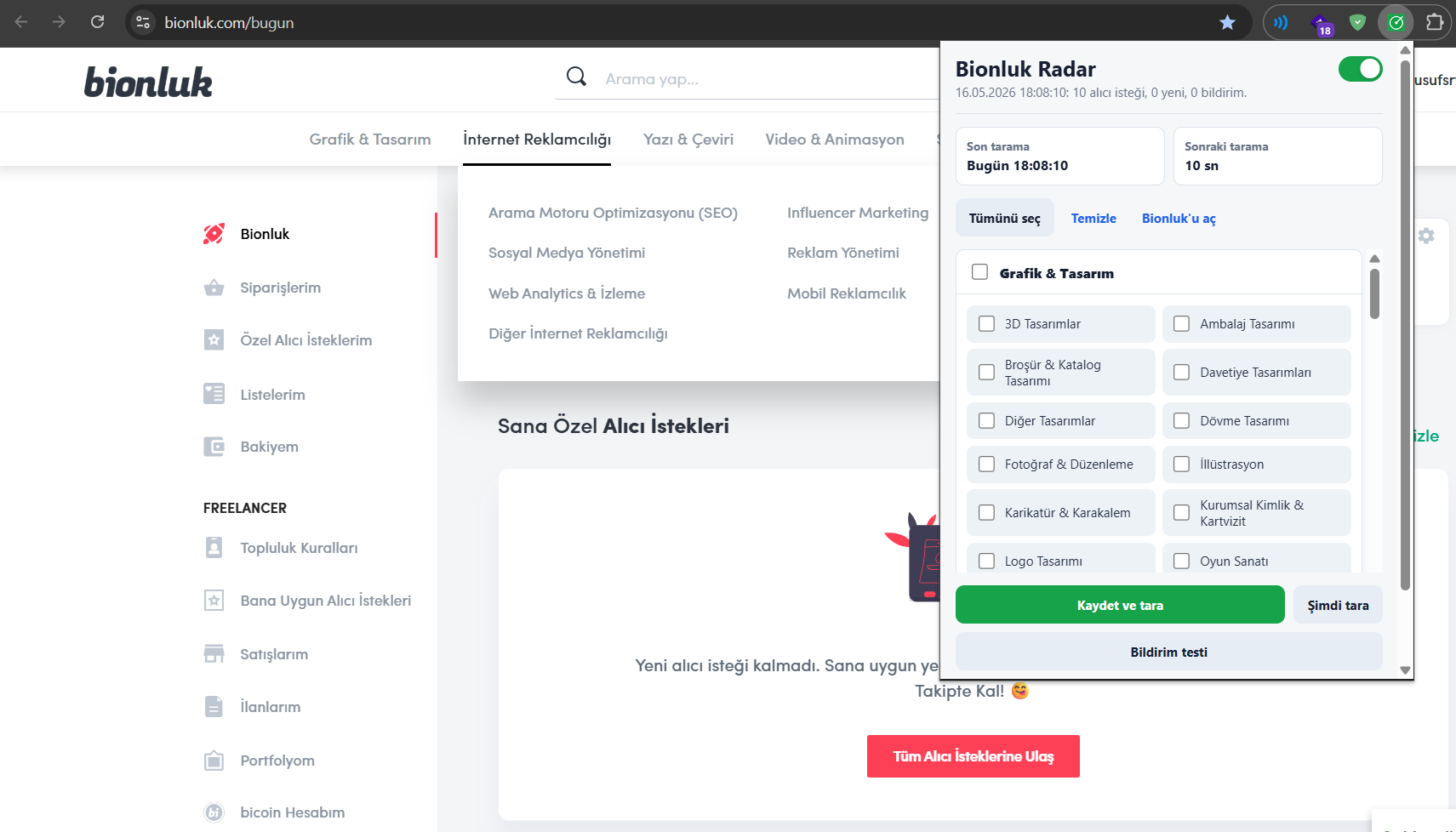
Bionluk Radar
Bionluk Radar is an open-source Chrome extension I developed to help freelancers on Bionluk notice new buyer requests faster.
The project was born from a real freelancer problem: instead of constantly checking the Bionluk panel manually, freelancers should be able to track relevant buyer requests automatically based on their selected categories and receive a notification when a new opportunity appears.
Bionluk Radar monitors the categories selected by the user, checks the private buyer request list through the logged-in Bionluk session at regular intervals, and sends a desktop notification when a new matching request is found. When the user clicks the notification, the Bionluk Private Buyer Requests page opens in a new tab.
Project Goal
Speed matters for freelancers. Seeing a new job opportunity early can help a freelancer respond faster and increase the chance of getting noticed before competitors.
The goal of this project was to build a simple and safe assistant tool that reduces the need for constantly checking the Bionluk panel manually, without interfering with the user’s account.
Bionluk Radar answers one simple question:
Is there a new Bionluk buyer request that matches my selected categories?
Core Features
- Buyer request tracking based on Bionluk categories
- Category-based notifications
- Automatic checks every 3 minutes
- Saves existing requests during the first scan
- Sends notifications only for newly detected matching requests
- Desktop notification support
- Opens the Bionluk Private Buyer Requests page when a notification is clicked
- Prevents duplicate notifications for already seen requests
- Does not ask for the user’s password
- Does not send offers or messages automatically
- Stores data locally in the browser
- Open-source and extensible architecture
Technical Approach
The project was built using Chrome Extension Manifest V3. A background service worker periodically checks the Bionluk buyer request endpoint. The selected category IDs are compared with the category data returned from the buyer request response.
When a new and relevant buyer request is detected, the extension creates a desktop notification using the Chrome Notifications API. When the notification is clicked, the related Bionluk page is opened in a new tab using the Chrome Tabs API.
Main technical components:
- Chrome Extension Manifest V3
- Background Service Worker
- Chrome Storage API
- Chrome Alarms API
- Chrome Notifications API
- Chrome Tabs API
- Local data storage
- Category ID matching
- Bionluk buyer request parser
Security Approach
One of the main goals of this project was to design a tool with clear security boundaries that does not interfere with the user’s account.
Bionluk Radar:
- Does not ask for the user’s Bionluk password
- Does not send offers on behalf of the user
- Does not send messages on behalf of the user
- Does not attempt to bypass captchas
- Does not send user data to an external server
- Stores data locally in the browser whenever possible
The extension stores the Bionluk session information locally in Chrome storage in order to check buyer requests through the logged-in session. This data is not sent to an external server. The project is designed only as a notification assistant.
Development Process
In this project, I focused not only on building a working extension but also on designing a structure that could evolve into a real product.
I started by analyzing the problem: freelancers may miss new buyer requests and often need to check the platform manually. Then I broke the problem down into smaller technical questions:
- Which categories does the user want to follow?
- How can Bionluk buyer requests be read?
- How can new requests be separated from already seen ones?
- How should the notification system work?
- How can the extension stay within safe boundaries without interfering with the user’s account?
Based on these questions, I designed the core architecture of the extension. The first version focuses on category selection, automatic scanning, local memory, new request detection, and desktop notifications.
My Contribution
The entire idea, analysis, architecture, and development process of this project were handled by me.
My responsibilities included:
- Defining the product idea based on a real user problem
- Designing the Chrome extension architecture
- Setting up the Manifest V3 structure
- Building the background worker flow
- Creating the Bionluk buyer request parser
- Developing the category matching logic
- Implementing local storage and duplicate notification prevention
- Building the desktop notification flow
- Preparing the README and open-source documentation
- Defining clear security boundaries
Roadmap
Planned improvements include:
- More reliable Bionluk parser
- Improved category matching system
- Telegram or Pushover mobile notifications
- Notification history screen
- Better error handling
- Edge and Firefox support
- Remote category list updates
- More advanced user settings
- Modular support for other freelance platforms such as Upwork
Project Summary
Bionluk Radar is an open-source Chrome extension that helps freelancers detect new job opportunities faster. It is built around a real-world need, with a simple user experience, clear security boundaries, and an extensible architecture.
This project reflects my software development approach: understanding the real problem first, breaking the system into small and manageable parts, keeping security boundaries clear, and building a clean architecture that can grow over time.